Free loan amortization schedule template for Excel
This free Excel template builds your loan's amortization schedule from five figures: amount, rate, term, first payment date and insurance. It gives the monthly payment, the total cost of the loan, the balance remaining after each payment and the interest paid each year. Direct download, no sign-up; it imports into Patrice as it is.
What the template contains: three tabs
A macro-free Excel workbook for a repayment loan with fixed monthly payments: a mortgage, a home improvement loan or a personal loan, for up to thirty years.
Amortization schedule
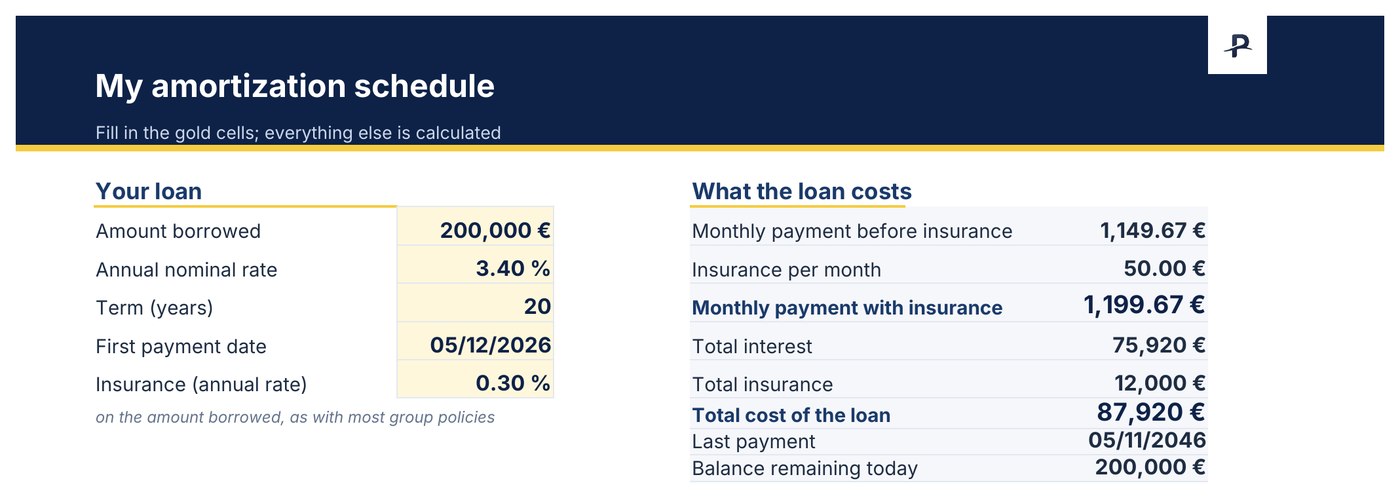
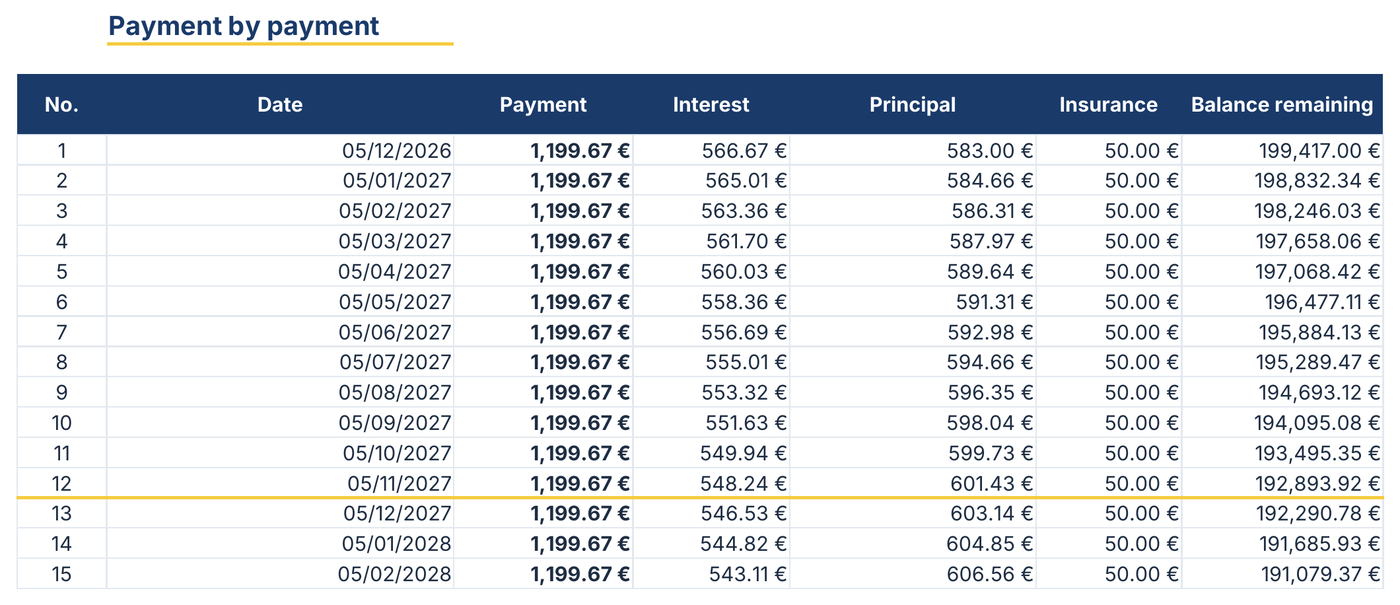
The five gold cells to fill in, the summary of what the loan costs beside them, and the full schedule below: for each payment, the date, the amount paid, the interest, the principal repaid, the insurance and the balance remaining. Up to 360 payments.
By year
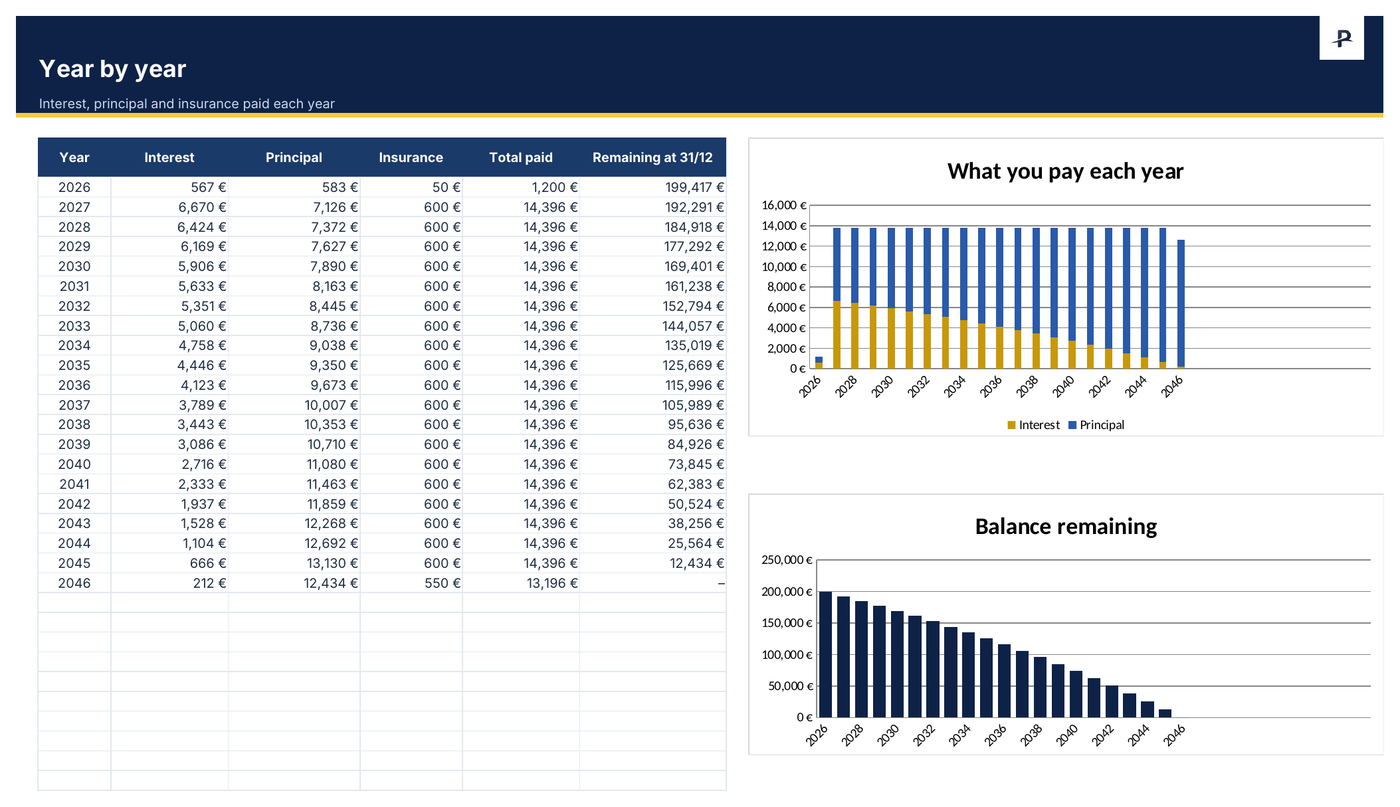
The interest, principal and insurance paid each year, the total paid and the balance remaining at 31 December, with two charts. For a loan that finances a let property in France, the year's interest is what the actual-expenses regime lets you deduct.
Read me
The instructions on one page. A worked example shows how to fill it in: replace it with the figures of your loan offer.
A look at the amortization schedule, filled in with the example
Monthly payment, interest, balance remaining: the schedule's calculations
The monthly payment before insurance on a fixed-payment loan comes from the PMT function: =PMT(annual rate/12, term in months, -amount borrowed). Each month, the interest is the balance remaining times the annual rate divided by 12; the rest of the payment repays principal. So the interest falls from one payment to the next, and the principal repaid rises.
With the template's example: €200,000 borrowed at 3.40% over 20 years, first payment on 5 December 2026, insurance at 0.30% a year on the amount borrowed. The monthly payment is €1,149.67 before insurance, €1,199.67 with the €50 of insurance. The first payment covers €566.67 of interest and repays €583 of principal. Over twenty years, the loan costs €75,920 in interest and €12,000 in insurance, €87,920 in all.
The calculation rounds each payment to the cent, and the last one clears the balance. Your bank's schedule remains the reference: a deferral, a variable rate or an early repayment makes it diverge.
Building your loan's amortization schedule in two minutes
Open the “Amortization schedule” tab and replace the five gold figures with those of your loan offer.
Read the summary: monthly payment with and without insurance, total interest, total cost, last payment date and balance remaining today.
Open “By year” for each year's interest and the balance left at 31 December.
For Google Sheets: upload the file to Google Drive, then “Open with › Google Sheets”.
From the Excel schedule to Patrice, with nothing to retype
This template imports into Patrice for free: in your loan's form, “Bank amortization table” › “Import the table (Excel, CSV)”. Patrice reads back the amount, rate, term and insurance from the table, and follows your remaining balance month after month in your net worth. The schedule provided by your bank imports the same way.
The year's interest also feeds the rental income calculation when the loan finances a let property; rental management is part of Premium.
The other free Excel templates
Net worth spreadsheet template
Your net worth month after month, in a free Excel spreadsheet. No sign-up.
Monthly budget spreadsheet
Income, spending, what is left and your savings rate, month by month. No sign-up.
Rental property spreadsheet
Yields, cash flow and rent month by month, with late payments spotted. No sign-up.
Frequently asked questions
When the spreadsheet is no longer enough.
Explore Patrice with sample data, with no account and no card, then import your amortization schedule.