Free rental property spreadsheet template for Excel
This free Excel template tracks your rental properties: it works out each one's gross and net yield, its monthly cash flow and its result for the year, and lays out your rent month by month so a missing payment stands out at a glance. Direct download, no sign-up and no email; it opens in Excel and Google Sheets.
What the template contains: four tabs
A macro-free Excel workbook for landlords who manage one or more properties themselves: a flat, a studio, a let house. Costs are labelled the French way (taxe foncière, copropriété), for property in France.
Properties
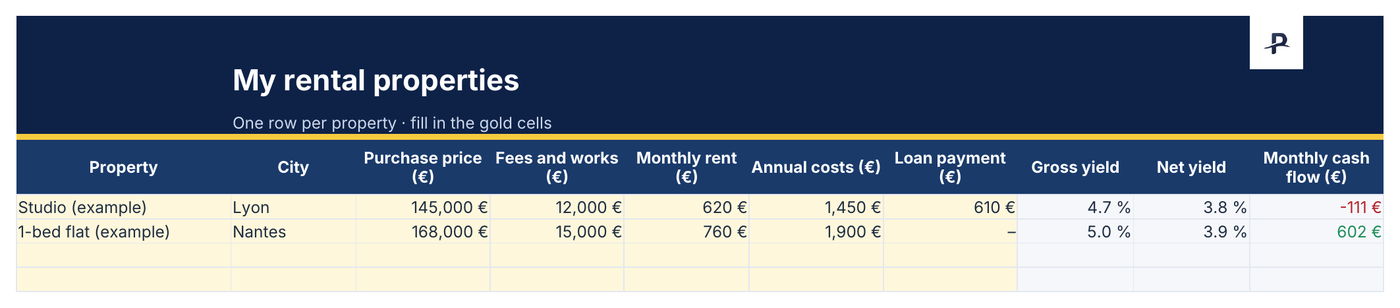
One row per property, up to twenty: purchase price, fees and works, rent, annual costs and loan payment. Gross yield, net yield and monthly cash flow are calculated for you.
Transactions
Every rent payment received and every expense, dated, with its property and type: property tax, service charges, insurance, works, management fees, loan interest. Up to five hundred rows.
Summary
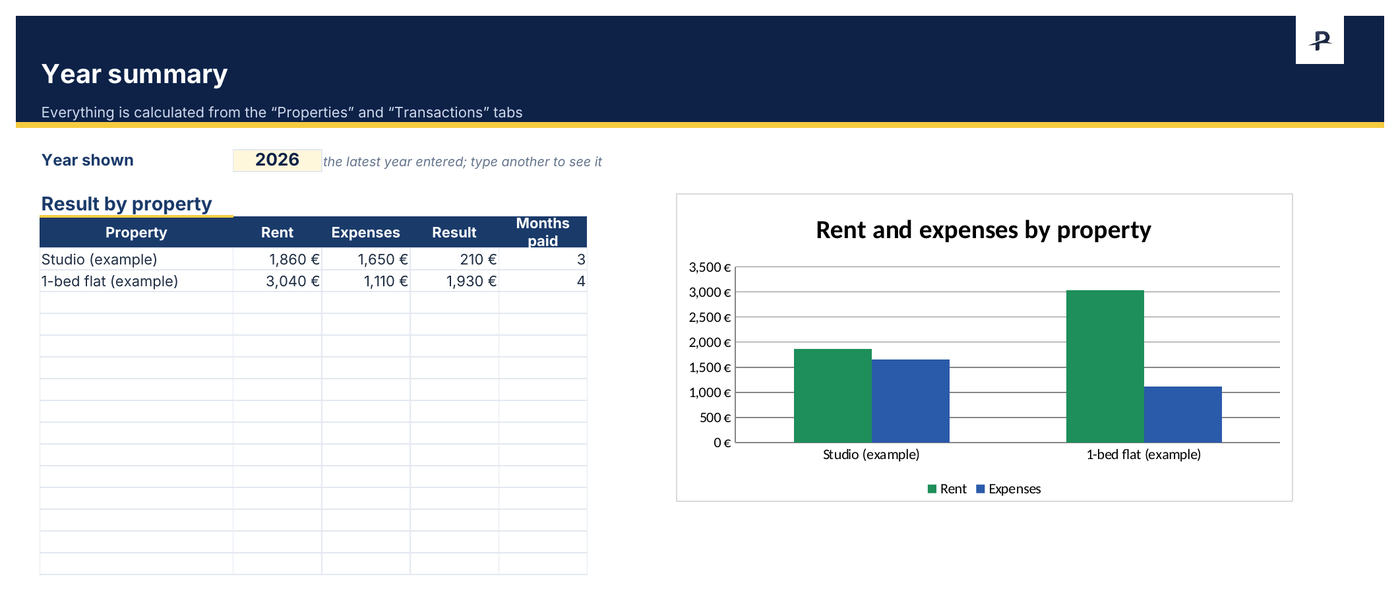
The chosen year: rent, expenses and result by property, the number of months paid, and the rent grid month by month, where a past month with no rent turns orange.
Read me
The instructions on one page. Two properties and a few months of made-up examples show how to fill it in: delete them before you start.
A look at the rental property template, filled in with the examples

Gross yield, net yield, cash flow: the template's three calculations
Gross yield = monthly rent × 12 ÷ (purchase price + fees and works). Net yield = (monthly rent × 12 − annual costs) ÷ (purchase price + fees and works), annual costs covering property tax, non-recoverable service charges, insurance and management fees. Monthly cash flow = rent − annual costs ÷ 12 − loan payment, before tax.
With the template's made-up examples: a studio bought for €145,000 with €12,000 of fees and works, let for €620 a month, with €1,450 of annual costs and a €610 loan payment, yields 4.7% gross and 3.8% net, for a cash flow of −€111 a month. A one-bedroom flat bought for €168,000 without a loan, with €15,000 of fees, let for €760, yields 5.0% gross and 3.9% net, and brings in €602 a month.
These yields are before tax: how the rent is taxed (micro-foncier or the actual-expenses regime in France) depends on all your income and cannot be worked out property by property.
Managing your rentals in ten minutes a month
On day one, describe each property in the “Properties” tab: price, fees and works, rent, annual costs, loan payment.
Each time rent comes in or an expense is paid, add a row in “Transactions” with the date, the property and the type.
Open the “Summary”: a past month with no rent shows up in orange. Late payment, vacancy or a missed entry: time to check.
For Google Sheets: upload the file to Google Drive, then “Open with › Google Sheets”.
When the spreadsheet is no longer enough
Patrice tracks rent month by month and surfaces late payments, issues rent receipts, imports managing-agent statements, works out the rental result across all your properties (actual or micro-foncier) and helps fill in form 2044. These features are part of Premium; the yield and cash flow indicators are free.
This template does not import into Patrice: rental management there is entered property by property, with its units and leases. It remains a complete tool for anyone managing one or two properties by hand.
Frequently asked questions
When the spreadsheet is no longer enough.
Explore Patrice with sample data, with no account and no card: properties, rent and rental result.